


Running a small business means wearing many hats, and marketing often feels like the most challenging one to fit properly. You’ve probably heard about Google Ads and wondered if it could help your business reach more customers. The good news? It absolutely can, and it’s more accessible than you might think.
Google Ads is Google’s online advertising platform that allows businesses to display ads across Google’s vast network, including search results, websites, and YouTube. When someone searches for products or services like yours, your ad can appear at the top of their search results, giving you prime visibility exactly when potential customers are looking for what you offer.
This comprehensive guide will walk you through everything you need to know about Google Ads, from basic concepts to advanced strategies. You’ll discover how this powerful tool can drive measurable growth for your business, understand the different types of campaigns available, and learn practical steps to get started. By the end, you’ll have the knowledge to make informed decisions about whether Google Ads fits your marketing strategy and budget.
What Are Google Ads and How Do They Work?
Google Ads operates on a pay-per-click (PPC) model, meaning you only pay when someone actually clicks on your ad. Think of it as renting prime real estate in the digital world—you’re paying for the best spots where your potential customers are already looking.
When you create a Google Ads campaign, you’re essentially entering an auction. Every time someone searches for keywords related to your business, Google runs a lightning-fast auction to determine which ads appear and in what order. The auction considers two main factors: your bid amount and your ad quality score.
Your bid is the maximum amount you’re willing to pay for a click, while your quality score depends on how relevant and useful Google considers your ad to be. This system ensures that users see helpful, relevant ads rather than just ads from the highest bidders.
The beauty of Google Ads lies in its intent-based targeting. Unlike traditional advertising where you’re interrupting people’s activities, Google Ads reaches people who are actively searching for solutions you provide. This makes your advertising dollars work harder and more efficiently.
4 Questions to Ask Before You Start
Before you spend a dollar, get clear on a few things. First, what is a new customer or lead worth to you? Knowing that number helps you set a sensible budget and judge results honestly. Second, which services or products do you want to promote first? Starting focused usually works better than advertising everything at once. Third, where will people land after they click? Sending ad traffic to a page built for that specific offer, with a clear call to action, often matters as much as the ad itself.
Fourth, how will you track results? Setting up conversion tracking for calls and form submissions lets you see which keywords and ads bring in real business, not just clicks. If you can answer these questions, you are in a strong position to make paid search work.
Google’s own Google Ads Help Center is a good place to learn the basics, and our digital marketing services page explains how we manage campaigns alongside a website built to turn clicks into calls.
Google Ads are an invaluable tool for businesses looking to generate more leads and increase sales. Google Ads allow you to target your message specifically, have complete control over the budget and timing of each campaign, as well as measure success with powerful data tracking tools. If you don’t have the technical expertise or time required to manage Google Ads campaigns yourself, Gova Creative can help. With years of experience managing Google Ads campaigns effectively, they will work with you to create a strategy that meets your specific needs so you get maximum ROI from your Google Ad spend quickly. Start taking advantage of all Google Ads has to offer today!
Understanding Different Types of Google Ads Campaigns
Google Ads offers several campaign types, each designed for different business goals and customer touchpoints. Understanding these options helps you choose the right approach for your specific needs.
Search Campaigns
Search campaigns are the foundation of most Google Ads strategies. These text-based ads appear when people search for specific keywords on Google. For example, if you run a plumbing business and someone searches “emergency plumber near me,” your ad could appear at the top of their results.
Search campaigns work exceptionally well for businesses with immediate solutions to urgent problems. They capture high-intent customers who are ready to take action, making them excellent for driving phone calls, website visits, and sales.
Display Campaigns
Display campaigns show visual ads across Google’s network of partner websites, reaching people as they browse online content. These image or video ads are perfect for building brand awareness and reaching potential customers who might not be actively searching for your services yet.
Small businesses often use display campaigns to stay top-of-mind with previous website visitors through remarketing, showing ads to people who’ve already expressed interest in their products or services.
Shopping Campaigns
If you sell physical products, Shopping campaigns can be game-changers. These ads display product images, prices, and your business name directly in search results, giving potential customers a preview before they even visit your website.
Shopping campaigns work particularly well for e-commerce businesses and retailers because they showcase products visually, helping customers make informed decisions quickly.
Video Campaigns
Video campaigns run on YouTube and across Google’s video partner sites. These campaigns are excellent for storytelling, demonstrating products or services, and building emotional connections with your audience.
Small businesses can create effective video campaigns without Hollywood budgets. Simple, authentic videos often perform better than overly polished productions because they feel more genuine and relatable.

Local Service Ads: A Game-Changer for Service Businesses
Local Service Ads (LSA) deserve special attention because they’re specifically designed for local service businesses like contractors, lawyers, real estate agents, and home service providers. These ads appear at the very top of search results, above even traditional Google Ads.
LSA operates differently from regular Google Ads. Instead of paying per click, you pay per lead—only when potential customers contact you directly through the ad. Google pre-screens businesses for LSA, which means displaying the “Google Guaranteed” badge that builds immediate trust with potential customers.
To qualify for LSA, businesses must pass background checks, license verifications, and insurance requirements. While this process requires more upfront effort, it provides significant advantages. The Google Guaranteed badge acts as a powerful trust signal, and the pay-per-lead model ensures you’re only paying for genuine business inquiries.
Service businesses using LSA often see higher conversion rates because the ads capture customers at the exact moment they need help, and the Google verification process reassures them they’re choosing a reliable provider.
Setting Your Google Ads Budget and Expectations
One of the biggest concerns small business owners have about Google Ads is cost. The platform accommodates virtually any budget, from $5 per day to thousands of dollars monthly. The key is understanding how to allocate your budget effectively.
Start by determining your customer lifetime value—how much profit an average customer generates for your business over time. This figure helps you understand how much you can reasonably spend to acquire a new customer. If your average customer is worth $500 in profit, spending $50 to acquire them through Google Ads represents a solid 10:1 return on investment.
Google Ads allows you to set daily budgets, giving you complete control over spending. You can start small, test what works, and gradually increase your budget as you see positive results. The platform provides detailed reporting so you can track exactly how your money is being spent and what results you’re getting.
Realistic expectations are crucial for Google Ads success. While some businesses see immediate results, most need several weeks to optimize their campaigns and see consistent performance. Plan for a learning period where you’ll be testing different ads, keywords, and targeting options to find what works best for your specific business.
Creating Effective Google Ads: Best Practices
Successful Google Ads campaigns start with understanding your customers’ language and search behavior. The words you use to describe your business might differ from how customers search for your services. For example, you might call yourself a “residential cleaning specialist,” but customers might search for “house cleaner” or “maid service.”
Your ad headlines should immediately address the searcher’s need and include your primary keywords. If someone searches for “emergency locksmith,” your headline might be “24/7 Emergency Locksmith Service” rather than your company name. Save your branding for the description lines where you can highlight what makes you different.
Ad descriptions should focus on benefits rather than features. Instead of saying “15 years of experience,” try “Get your locks fixed right the first time.” Customers care more about outcomes than credentials, though both have their place in your overall message.
Include clear calls-to-action that tell people exactly what you want them to do: “Call Now,” “Get Free Quote,” “Schedule Today.” Make it easy for interested customers to take the next step with your business.
Measuring Success and ROI
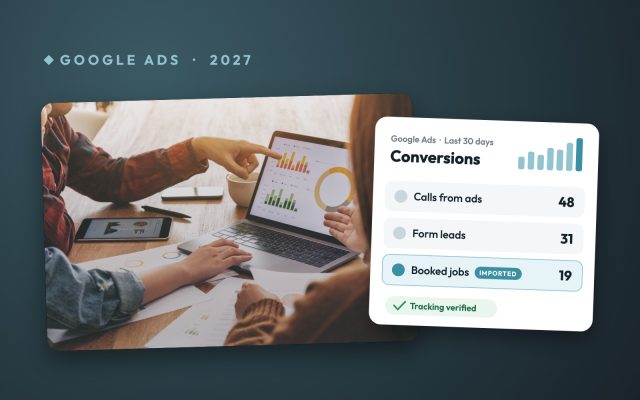
Google Ads provides extensive data about your campaign performance, but the key is focusing on metrics that matter for your business goals. Clicks and impressions are interesting, but conversions—actual phone calls, form submissions, or sales—are what drive business growth.
Set up conversion tracking from the beginning to measure meaningful actions people take after clicking your ads. This might include phone calls from your ads, contact form submissions, or online purchases. Conversion tracking shows you which keywords, ads, and campaigns actually generate business rather than just website traffic.
Return on ad spend (ROAS) is perhaps the most important metric for small businesses. Calculate this by dividing your revenue from Google Ads by your ad spend. A ROAS of 3:1 means you’re generating $3 in revenue for every $1 spent on ads—a healthy return for most businesses.
Monitor your cost per conversion to ensure you’re acquiring customers profitably. If you typically profit $200 from each new customer and your cost per conversion is $40, you’re generating a strong 5:1 return on your advertising investment.
5 Google Ads Mistakes That Drain Your Budget
Mistake #1: Ignoring Negative Keywords
Negative keywords might be the most overlooked feature in Google Ads, yet they’re one of the most powerful budget-saving tools at your disposal. When you fail to use negative keywords, your ads can show up for searches that have nothing to do with your business.
Consider a San Antonio plumbing company advertising for “emergency plumber.” Without negative keywords, their ads might appear for searches like “plumber salary,” “plumber jokes,” or “plumber training courses.” These clicks cost money but bring zero potential customers.
The solution starts with building a comprehensive negative keyword list. Begin by reviewing your search terms report in Google Ads. Look for queries that triggered your ads but clearly indicate the searcher isn’t interested in buying your product or service.
Common negative keywords for most businesses include:
- Free
- Jobs
- Careers
- Training
- Reviews (unless you’re specifically targeting review-related searches)
- Cheap
- DIY
Add these negative keywords at both the campaign and ad group levels. This prevents your ads from showing for irrelevant searches while preserving your budget for qualified prospects. A well-maintained negative keyword list can reduce wasted spend by 20-30% without impacting your conversion rate.
Mistake #2: Setting and Forgetting Your Campaigns
Google Ads isn’t a “set it and forget it” platform, despite what some San Antonio marketing agencies might suggest. The digital advertising landscape changes constantly—new competitors enter the market, search trends shift, and customer behavior evolves.
Many business owners launch their campaigns with initial excitement, then check back weeks later only to discover their cost-per-click has doubled while their conversion rate has plummeted. This happens because they’re not actively managing their campaigns.
Successful Google Ads management requires regular attention. Check your campaigns at least twice per week, focusing on these key metrics:
- Cost per click trends
- Quality Score changes
- Conversion rate fluctuations
- New search terms appearing in your reports
Set up automated alerts in Google Ads to notify you when performance drops below acceptable thresholds. If your cost per click increases by more than 20% or your conversion rate drops below your target, you’ll receive an email alert prompting immediate action.
Regular campaign maintenance also includes adjusting bids based on performance data. If certain keywords consistently deliver high-quality leads at a reasonable cost, increase their bids to capture more traffic. Conversely, reduce bids on keywords that generate clicks but few conversions.
Mistake #3: Broad Match Keywords Without Strategy
Broad match keywords can be a powerful tool for discovering new opportunities, but they can also be a budget-burning disaster when used carelessly. Google’s broad match algorithm interprets your keywords very liberally, sometimes showing your ads for searches that barely relate to your business.
For example, a San Antonio marketing agency bidding on the broad match keyword “marketing services” might find their ads showing for searches like “marketing degree requirements” or “marketing book recommendations.” These searches indicate research intent, not buying intent.
The key isn’t avoiding broad match entirely—it’s using it strategically. Start with exact match and phrase match keywords to establish baseline performance. Once you understand which specific terms drive conversions, gradually introduce broad match variants of your best-performing keywords.
When you do use broad match keywords, implement these safeguards:
- Start with lower bids than your exact match keywords
- Monitor search terms reports weekly
- Add irrelevant terms to your negative keyword list immediately
- Use audience targeting to narrow who sees your broad match ads
Smart bidding strategies like Target CPA or Target ROAS work particularly well with broad match keywords because they use machine learning to optimize for conversions rather than just clicks.

Mistake #4: Poor Landing Page Alignment
Your Google Ads might be perfectly crafted, but if they lead to poorly aligned landing pages, you’re wasting money on two fronts: higher cost-per-click due to low Quality Scores and lower conversion rates due to confused visitors.
Google evaluates the relevance between your ad, keywords, and landing page when calculating Quality Score. Poor alignment results in higher costs for the same ad positions. More importantly, visitors who click your ad expecting one thing but find something else will leave immediately.
Landing page alignment goes beyond just mentioning your keywords on the page. The messaging, offer, and call-to-action in your ad must match what visitors find when they click through. If your ad promises “24/7 emergency service,” your landing page better prominently feature that same promise.
Create dedicated landing pages for different ad groups rather than sending all traffic to your homepage. A San Antonio marketing agency advertising SEO services should send visitors to a page specifically about SEO, not their general services page.
Key elements of well-aligned landing pages include:
- Headlines that echo your ad copy
- Clear value propositions that match your ad promises
- Contact forms or phone numbers prominently displayed
- Fast loading speeds (under 3 seconds)
- Mobile-responsive design
Test different landing page variations to find what works best for your audience. Even small improvements in conversion rates can dramatically impact your return on ad spend.
Mistake #5: Bidding on Competitor Names
Bidding on competitor names seems like a clever strategy—after all, if someone searches for your competition, they’re clearly in buying mode. However, this approach often backfires for small businesses with limited budgets.
When you bid on competitor names, you’re essentially paying premium prices for prospects who are already interested in another business. These clicks typically have lower conversion rates because visitors are specifically looking for your competitor, not you.
Google also tends to favor the actual business being searched for in ad auctions. This means you’ll often pay more for lower ad positions when bidding on competitor terms. A San Antonio marketing agency bidding on competitors’ names might find themselves paying $15 per click for bottom-of-page positions that generate few conversions.
Instead of competing directly on competitor names, focus your budget on these more effective strategies:
- Target problem-solving keywords that indicate purchase intent
- Bid on industry terms rather than specific company names
- Create campaigns around your unique value propositions
- Target customers who have visited competitor websites using audience lists
If you must bid on competitor names, do so strategically. Focus only on your closest competitors and create highly specific ad copy that clearly differentiates your offering. Use these campaigns sparingly and monitor their performance closely.
Working with a Marketing Agency vs. Managing Google Ads Yourself
Deciding whether to manage Google Ads yourself or work with a marketing agency depends on your available time, expertise, and business complexity. Both approaches have merits, and the best choice varies by situation.
Managing Google Ads yourself gives you complete control and keeps costs lower since you’re not paying agency fees. Google provides extensive training resources, and the platform is designed to be user-friendly for small businesses. This approach works well if you have time to learn the platform and stay current with best practices.
However, Google Ads management requires ongoing attention. Successful campaigns need regular optimization, keyword research, ad testing, and performance analysis. If you’re already stretched thin running your business, adding Google Ads management to your plate might impact the attention both deserve.
Marketing agencies bring specialized expertise and dedicated time to your campaigns. Experienced agencies have managed campaigns across various industries and can apply proven strategies to your business. They stay current with platform changes and best practices, potentially delivering better results faster than learning everything yourself.
When evaluating marketing agencies, look for those with experience in your industry and clear communication about their strategies and results. Good agencies provide regular reporting and explain their recommendations in terms you understand. They should also be transparent about their fee structure and what services are included.
Getting Started: Your Next Steps
Starting with Google Ads doesn’t require a massive commitment or budget. Begin by clearly defining your business goals—whether that’s increasing phone calls, generating leads, or driving online sales. This clarity helps you choose the right campaign type and measure success effectively.
Research keywords your potential customers use when searching for your services. Google’s Keyword Planner tool provides search volume data and keyword suggestions to help you identify the most relevant terms for your business.
Create a simple campaign structure focusing on your most important services or products. Start with search campaigns targeting your highest-value keywords, and consider LSA if you’re a local service business. Set a conservative daily budget that allows for learning and optimization without straining your finances.
Monitor your campaigns closely during the first few weeks, making small adjustments based on performance data. Look for keywords generating conversions and consider increasing bids for those terms. Pause or reduce bids for keywords that aren’t performing well.
Get Google Ads That Bring in Leads
Google Ads can bring you calls this week, or it can quietly burn your budget for months. The difference is the setup, the landing page and someone watching the numbers every week.
Gova Creative manages Google Ads for San Antonio businesses for $1500 a month plus your ad spend, with a 90-day results guarantee. We set a lead goal with you at kickoff, and if the campaign does not hit it in the first 90 days, your next month of management is free. Book a Discovery Call and we will look at what your ads should be doing.


Want help putting this to work?
One team for your website, videos, ads and brand, built as one plan. Let’s talk about your goals.
Book a Discovery Call 30 minutes · Real answers · No sales pitch